Metrics
A metric measures one specific aspect of your agent's output — for example, how closely an answer matches the reference answer, whether it stays faithful to the documents the agent retrieved, whether its tone stays professional. Each metric is measured at two levels: it scores every test case in the benchmark on its own, and those scores are aggregated into one benchmark-level figure for the metric — an average with a confidence interval.
Both levels are reported, and both are worth reading. The benchmark-level figure is the headline, the one to compare between agent versions, prompts, or models. The per-case scores are where you find out why it is what it is: which cases the agent handled badly on that aspect, and what they have in common.
MorganaBench has two kinds of metrics, and a single evaluation can use any mix of both:
- System metrics — the fixed set MorganaBench ships, covering the properties on which retrieval or tool-using agents are commonly evaluated. See System metrics.
- Custom metrics — prompt-based judges you author yourself, for standards specific to your product. You write the criteria in plain language and declare what the judge sees and what shape its score takes. See Custom metrics.
Both kinds appear together on the Metrics page in the UI and in mb metrics list. Which metrics an evaluation computes is chosen when it is created, and can be extended afterwards — see Evaluation.
For where metrics fit into the wider flow, see Overview. For evaluation statuses and the agent-output file format, see Evaluation.
System metrics
MorganaBench ships a set of built-in system metrics, some are useful for search benchmarks and some for tool-use ones.
| Metric | What it measures | Values | Direction |
|---|---|---|---|
ground_truth_alignment |
The degree to which the reference answer is covered by the response. | 0.0–1.0 |
Higher is better |
ground_truth_contradiction |
The degree to which the reference answer is contradicted by the response. | 0.0–1.0 |
Lower is better |
faithfulness |
The degree to which the response is supported by the retrieved documents. | 0.0–1.0 |
Higher is better |
query_relevance |
The degree to which the response is relevant to the user's request. | 0.0–1.0 |
Higher is better |
context_sufficiency |
The degree to which the reference answer is supported by the retrieved documents. | 0.0–1.0 |
Higher is better |
refusal |
The rate at which the agent refuses requests it was expected to answer. | 0 or 1 |
Lower is better |
tool_call_correctness |
The rate at which the agent makes every expected tool call with the right arguments. | 0 or 1 |
Higher is better |
no_tool_call_correctness |
How correct the agent's response is when no tool call is expected. | 0.0–1.0 |
Higher is better |
tool_call_correctness and no_tool_call_correctness apply only to tool-use benchmarks. no_tool_call_correctness scores 0 whenever the agent calls a tool. Otherwise it grades the response: against the case's compliance expectations when it has any (1 if all pass, 0 if any fail), and otherwise by its alignment with the expected response (0.0–1.0).
The table is rendered from the same descriptions the web UI shows and mb metrics list --output json returns.
Custom metrics
Custom metrics are metrics you author and configure yourself. Where the system metrics cover what applies to agents in general, a custom metric states a standard particular to your product — for example, a support agent that must always offer an escalation path, a regulated assistant that must cite the governing policy, a medical assistant that must never speculate. You write the criteria in plain language, choose what the metric looks at and what shape its score takes, and every case is then scored against it by an LLM judge.
Custom metrics belong to your organization and are reusable: one definition, applied to as many evaluations as you like, so the same standard is measured the same way every time. A metric's name is unique among your organization's active metrics.
Authoring happens in the web UI (Metrics → Create), which is where the config editor and the score preview live.
Definition
A custom metric is a name, an optional description, and a config with these fields:
| Field | Required | Description |
|---|---|---|
scoring_instructions |
Yes | The criteria, in plain language — what the judge is asked to decide, and what each score means. This is the metric's semantics; everything else is scaffolding. Reaches the judge verbatim; see What the judge receives. Up to 20,000 characters. |
direction |
Yes | HIGHER_IS_BETTER or LOWER_IS_BETTER. |
score_type |
Yes | BINARY — a pass/fail score reported as 0 or 1 — or INTEGER_SCALE. |
integer_scale |
Only for INTEGER_SCALE |
The inclusive {min, max} the judge scores on. Any range with max > min is allowed, including negative-anchored ones such as -2–2. Must be omitted for BINARY. |
input |
Yes | Which parts of each case the judge sees. See Inputs. |
Write the scale into the criteria
integer_scale tells the judge which integers are legal; it does not tell it what they mean. Spell out the anchors in scoring_instructions — "1 = the answer is dismissive, 3 = neutral, 5 = warm and explicitly offers further help".
Inputs
input nominates the parts of each case the judge is handed. Four fields are available:
| Field | Read from |
|---|---|
conversation |
The user's request with the previous conversation messages, from inputs.messages. |
agent_response |
The agent response from outputs.response, as the agent wrote it. |
retrieved_context |
The documents the agent retrieved, from outputs.trace. |
reference |
The reference answer, from expectations, as a list of claims. |
Each field carries one of three inclusion flags, which decide both whether the judge sees it and what a case missing it means.
| Inclusion | The judge sees it | A case missing it |
|---|---|---|
REQUIRED |
Always. | Is ineligible — reported, and left out of the average. See Per-case scores. |
OPTIONAL |
When present. | Is scored; the section is simply omitted from the prompt. |
DISABLED |
Never. | Is scored; its presence is irrelevant. |
At least one field must be REQUIRED.
Choose REQUIRED for what the criteria genuinely cannot be judged without, and OPTIONAL for context that helps when it exists.
The reference and the response
The judge reads the reference answer as claims and the agent response as prose:
- The reference answer is a list of the claims a correct response states: the case's own claims, or, when it has only an expected response, claims extracted from it.
- The agent response is shown exactly as the agent wrote it.
So a criterion that compares the response with the reference — coverage, contradiction, unsupported additions — reads claim by claim against the response's own wording.
What the judge receives
When you create a metric in the UI, the scoring_instructions contains a preamble which is generated automatically from the input fields you selected. The second half is your own scoring criteria, which is limited to 20,000 characters.
For example:
You are given a request (with any earlier turns in the conversation), an agent response, and the reference answer (as a list of claims).

---

<your criteria>
That preamble is composed by the authoring page. Through the CLI or the API directly, the scoring_instructions you send are what the judge is given, verbatim — so write any framing you want into them yourself.
A worked example
A 1–5 politeness metric that reads the request and the agent's prose, ignores retrieval and the reference answer entirely, and skips any test case where the agent produced nothing:
{
  "name": "Tone Politeness",
  "description": "Whether the agent's answer stays polite and professional.",
  "config": {
    "scoring_instructions": "Score the politeness and professionalism of the agent response, given the user's request. 1 = dismissive, curt, or blaming the user. 2 = noticeably brusque. 3 = neutral and businesslike. 4 = courteous. 5 = warm and courteous, and explicitly offers further help. Judge only tone and register — never whether the answer is correct, complete, or well formatted.",
    "direction": "HIGHER_IS_BETTER",
    "score_type": "INTEGER_SCALE",
    "integer_scale": { "min": 1, "max": 5 },
    "input": {
      "conversation": "REQUIRED",
      "agent_response": "REQUIRED",
      "retrieved_context": "DISABLED",
      "reference": "DISABLED"
    }
  }
}
A binary metric checking that no medical advice is given would instead be "score_type": "BINARY" with integer_scale omitted, and "direction": "LOWER_IS_BETTER" if 1 marks the violation.
Preview before you save
The authoring page scores a draft against real rows before you commit to it: import an agent-output file, select rows, and run a preview.
Previewing a draft is recommended: it is how you confirm the metric behaves as you expect, and identify problems, before the metric is saved and used in an evaluation.
Per-case scores
A metric visits every case in the evaluated benchmark, and on each one it ends in exactly one of three states:
| Outcome | Meaning | Effect on the average |
|---|---|---|
| Scored | The judge returned a score. | Counted in the average. |
| Ineligible | The case lacks something the metric requires — for example no expected response, for a metric that compares against one. It is reported, not scored. | Left out of the average. |
| Error | Scoring was attempted and failed, most often because a content-policy filter blocked the judge. | Left out of the average. |
Each ineligible case carries a code, shown on hover in the results table:
| Code | The case has no | Produced by |
|---|---|---|
MISSING_EXPECTED_RESPONSE |
reference answer (the claims or response item of expectations) |
most system metrics; a custom metric whose reference is REQUIRED |
MISSING_INPUT_MESSAGES |
user messages (inputs.messages), or a case whose last message is not from the user |
tool_call_correctness, no_tool_call_correctness, ground_truth_alignment, ground_truth_contradiction, refusal; a custom metric whose conversation is REQUIRED |
MISSING_NO_TOOL_CALL_EXPECTATION |
no-tool-call expectation (no_tool_called in expectations) |
no_tool_call_correctness |
MISSING_AGENT_RESPONSE |
agent response (outputs.response) |
a custom metric whose agent_response is REQUIRED |
MISSING_RETRIEVED_CONTEXT |
retrieved documents (in outputs.trace) |
a custom metric whose retrieved_context is REQUIRED |
A case that expects a refusal carries no expected response, so it is ineligible for the metrics that compare against one.
A missing agent response is scored, not skipped
System metrics treat a missing or empty agent response as a failure by the agent, not as missing data: ground_truth_alignment scores 0.0, refusal scores 1.0 (producing nothing counts as a refusal), faithfulness and context_sufficiency score 0.0, and tool_call_correctness scores 0 when the case expected a tool call and 1 when it expected none. It is missing expectations that make a case ineligible. Custom metrics differ: when agent_response is REQUIRED, a missing agent response makes the case ineligible; when it is OPTIONAL, the case is scored anyway, even if the response is missing.
Benchmark-level results
Over the cases it scored, each metric on a finished evaluation reports:
| Field | Description |
|---|---|
n_total |
Cases submitted for scoring. |
n_scored |
Cases the judge scored. |
n_ineligible |
Cases skipped as ineligible. |
n_errors |
Cases whose scoring failed. |
mean_score |
The average over the scored cases only, on the metric's own value scale. null when nothing was scored. |
confidence_interval |
95% confidence interval for that average, clamped to the metric's own value range. null when it cannot be computed (e.g. a single scored case). |
n_scored + n_ineligible + n_errors == n_total.
Results are keyed by metric: a system metric by its name (ground_truth_alignment), a custom metric by custom:<metric_id>.
Reading a score
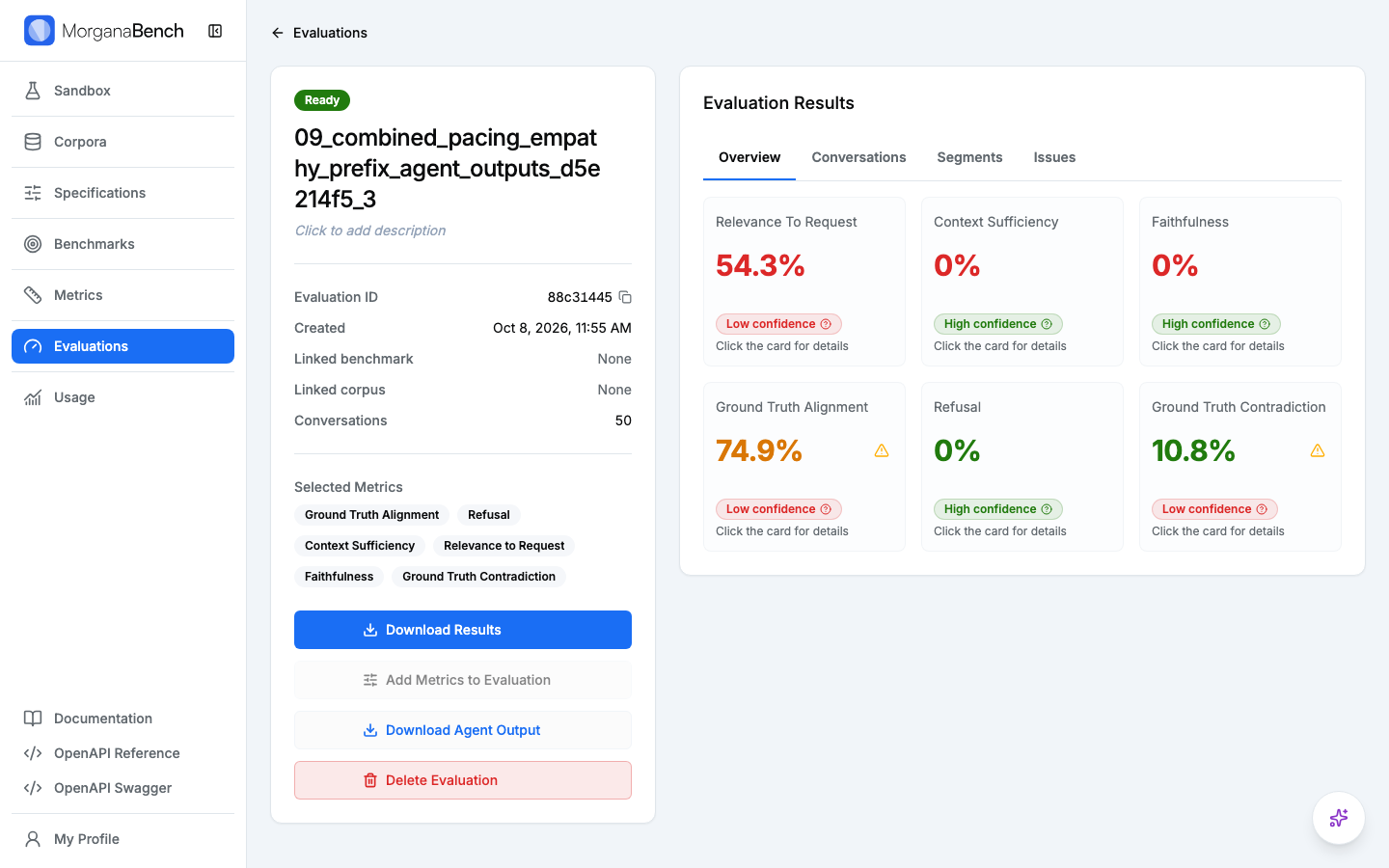
The Overview cards, the Case details tab and the Segments table color scores and show their confidence in the same way.
Color shows where the score falls in the metric's range:
| Metric direction | Good | Fair | Poor |
|---|---|---|---|
| Higher is better | 80% or more | 60–79% | below 60% |
| Lower is better | 20% or less | 21–40% | above 40% |
Confidence shows how precise a score is. It is based on the width of its 95% confidence interval relative to the metric's range:
| Confidence | Condition |
|---|---|
| High | Interval up to 5% of the range |
| Medium | Interval between 5% and 10% of the range |
| Low | Interval wider than 10% of the range, or fewer than 10 scored cases |
The Overview cards show the confidence as a badge. The Case details tab and the Segments table mark low-confidence scores with an icon. A larger benchmark gives narrower intervals.
See also
- Evaluation — choosing metrics for an evaluation, statuses, and how results are reported.
- Segment analysis — a metric broken down by dimension.
- Metrics UI guide — the gallery, detail pages, and creating, duplicating and deleting custom metrics.